Admin Portal
The On Key Plus admin portal is a web front-end with the same look-and-feel as the On Key front-end. The admin portal is hosted together with On Key and can be accessed by On Key system administrators.
Only authenticated users are allowed to use the admin portal. On Key system administrators need to be setup to use the identity providers configured for the On Key cluster by using the admin portal or On Key CLI (Command Line Interface). The identity providers used for authentication are not linked to any of the identity providers used by tenants within an On Key cluster. Note that from an admin portal point of view, clients are referred to as "tenants".
Once authenticated, On Key system administrators have the ability to inspect, monitor and manage the different configuration aspects of the On Key cluster and tenants. The configuration information is displayed as a hierarchy of configuration topics within the Admin Portal Overview tree structure.
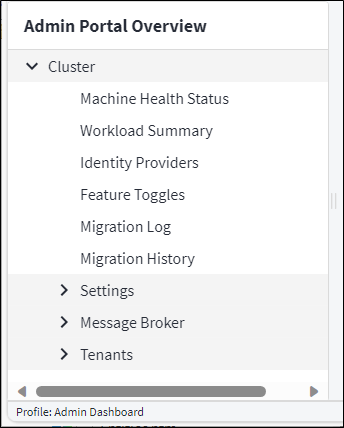
Clicking any of the topics within the tree will load and display the configuration information for the topic. Where applicable, the configuration details can be changed using the normal On Key front-end functionality. All configuration changes will be validated and any errors will be displayed using the Messages sidebar.
As with the On Key front-end, the On Key Assist sidebar will display topic sensitive commands that become available as the On Key system administrator navigates through the Admin Portal Overview tree.