Notification Examples
A change data trigger can be configured for any change that occurs on an entity. The trigger is used to send a notification when a change is made on that entity. Notification templates are used to build the notifications that are sent when a change data trigger is activated. Notification events are notifications or messages that are generated by On Key and sent to the specified recipients when a trigger is activated.
In order to successfully send a notification about a data change, the following needs to be configured:
- a change data trigger;
- change data trigger criteria;
- a notification template;
- a change data trigger notification event.
The following examples demonstrate On Key's notification functionality in a practical way.
Work orders
Example 1: Work order assigned
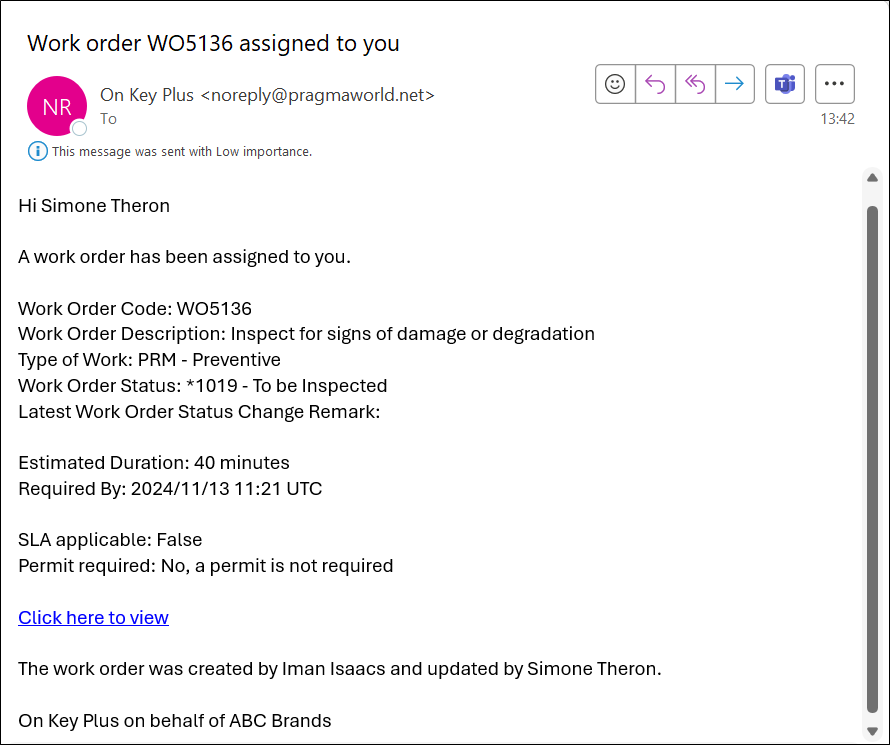
A notification email is sent to the staff member to whom the work order has been assigned.
1.1 Change data trigger
Create a new change data trigger record and capture the following values on each of the tabs of the change data trigger edit screen.
| Overview | |
|---|---|
| Entity Type | Work Order
|
| Trigger Once | True |
1.2 Change data trigger criteria
From the Criteria tab on the change data trigger edit screen, create a new change data trigger criteria record and capture the following values on each of the tabs of the change data trigger criteria edit screen.
| Overview | |
|---|---|
| Change Type | Updated
|
| Details | |
| Filter Expression | WorkOrder->Status_BaseStatus ne 'Cancelled' and WorkOrder->Status_BaseStatus ne 'Closed' and WorkOrder->Status_BaseStatus ne 'Completed'
|
1.3 Notification template
Create a new notification template record and capture the following values on each of the tabs of the notification template edit screen.
| Overview | |
|---|---|
| Entity Type | Work Order
|
| Output Type | Email
|
| Queries | |
| Use Audience Query | True |
| Audience Query | WorkOrder->StaffMember_*Id.User.AssociatedStaffMember_PrimaryEmail
|
| Use Body Query |
True |
| Body Query | WorkOrder->Code,
|
| Output Language | Dynamic
|
| Language Query | WorkOrder->StaffMember_*Id.User.AssociatedStaffMember_DefaultLanguage_Id
|
| Templates | |
| Subject | New work order {#Code#} assigned to you
|
| Body | {# wrap html:
|
1.4 Change data trigger event
From the Notification Events tab on the change data trigger record, create a change data trigger notification event record to link the change data trigger and notification template records created above.
Example 2: Approved work order cancelled
When an approved work order is cancelled, a notification email is sent to the staff member to whom a work order had been assigned.
2.1 Change data trigger
Create a new change data trigger record and capture the following values on each of the tabs of the change data trigger edit screen.
| Overview | |
|---|---|
| Entity Type | Work Order
|
| Trigger Once | True |
2.2 Change data trigger criteria
From the Criteria tab on the change data trigger edit screen, create a new change data trigger criteria record and capture the following values on each of the tabs of the change data trigger criteria edit screen.
| Overview | |
|---|---|
| Change Type | Updated
|
| Details | |
| Filter Expression | WorkOrder->Status_BaseStatus ne 'Closed' and WorkOrder->Status_BaseStatus ne 'Completed'
|
| Old Value Expression | WorkOrder->Status_BaseStatus = 'Approved'
|
| New Value Expression | WorkOrder->Status_BaseStatus = 'Cancelled'
|
2.3 Notification template
Create a new notification template record and capture the following values on each of the tabs of the notification template edit screen.
| Overview | |
|---|---|
| Entity Type | Work Order
|
| Output Type | Email
|
| Queries | |
| Use Audience Query | True |
| Audience Query | WorkOrder->StaffMember_*Id.User.AssociatedStaffMember_PrimaryEmail
|
| Use Body Query |
True |
| Body Query | WorkOrder->Code,
|
| Output Language | Dynamic
|
| Language Query | WorkOrder->StaffMember_*Id.User.AssociatedStaffMember_DefaultLanguage_Id
|
| Templates | |
| Subject | Approved work order {#Code#} cancelled
|
| Body | {# wrap html:
|
2.4 Change data trigger event
From the Notification Events tab on the change data trigger record, create a change data trigger notification event record to link the change data trigger and notification template records created above.
Example 3: Critical work order email
Notification template
Create a new notification template record and capture the following values on each of the tabs of the notification template edit screen.
| Overview | |
|---|---|
| Entity Type | Work Order
|
| Output Type | Email
|
| Queries | |
| Use Audience Query | True |
| Audience Query | WorkOrder->Site_*Id.SiteContactEmail.Site_Email
|
| Audience Query Filter | WorkOrder->Site_*Id.SiteContactEmail.Site_SequenceNumber = 1
|
| Use Body Query | True |
| Body Query | WorkOrder->Code,
|
| Output Language | Dynamic
|
| Language Query | WorkOrder->Site_DefaultLanguage_Id
|
| Templates | |
| Subject | Work order {#Code#} is critical!
|
| Body | {# wrap html:
|
Example 4: Work order no longer critical email
Notification template
Create a new notification template record and capture the following values on each of the tabs of the notification template edit screen.
| Overview | |
|---|---|
| Entity Type | Work Order
|
| Output Type | Email
|
| Queries | |
| Use Audience Query | True |
| Audience Query | WorkOrder->Site_*Id.SiteContactEmail.Site_Email
|
| Audience Query Filter | WorkOrder->Site_*Id.SiteContactEmail.Site_SequenceNumber = 1
|
| Use Body Query | True |
| Body Query | WorkOrder->Code,
|
| Output Language | Dynamic
|
| Language Query | WorkOrder->Site_DefaultLanguage_Id
|
| Templates | |
| Subject | Work order {#Code#} is no longer critical
|
| Body | {# wrap html:
|
Work requests
Example 5: New work request email
This notification template applies to clients who want to trigger an email to the relevant resource when a new work request is logged. A preconfigured site resource gets notified, based on the user defined field selected on a work request for the specific site.
Before you start
- Configure a user defined field on the work request to determine which department is responsible for the work request. In this example, the user defined field Name value is
Context. Set up predefined values for this user defined field. Refer to User Defined Fields for more information. - Configure a resource context record for each user defined field predefined value set up in step 1. The Code value of each resource context record should be equal to the corresponding predefined value Value field. Refer to Resource Contexts for more information.
- Configure resource emails and link the correct Email Type to the resource that should receive emails for new work requests. In this example, the Email Type value is
WR. Refer to Resources for more information. - Configure site resources and link the correct resource context record per site. Refer to Sites for more information.
5.1 Change data trigger
Create a new change data trigger record and capture the following values on each of the tabs of the change data trigger edit screen.
| Overview | |
|---|---|
| Entity Type | Work Request
|
| Trigger Once | True |
5.2 Change data trigger criteria
From the Criteria tab on the change data trigger edit screen, create a new change data trigger criteria record and capture the following values on each of the tabs of the change data trigger criteria edit screen.
| Overview | |
|---|---|
| Change Type | Created
|
| Details | |
| Filter Expression | WorkRequest->Site_*Id.SiteResource.Site_Resource_*Id.ResourceEmail.Resource_EmailType_Code = 'WR'
and
WorkRequest->Site_*Id.SiteResource.Site_ResourceContext_Code = WorkRequest->ContextPredefined_Value
|
5.3 Notification template
Create a new notification template record and capture the following values on each of the tabs of the notification template edit screen.
| Overview | |
|---|---|
| Entity Type | Work Request
|
| Output Type | Email
|
| Queries | |
| Use Audience Query | True |
| Audience Query | WorkRequest->Site_*Id.SiteResource.Site_Resource_*Id.ResourceEmail.Resource_Email
|
| Audience Query Filter | WorkRequest->Site_*Id.SiteResource.Site_Resource_*Id.ResourceEmail.Resource_EmailType_Code = 'WR'
and
WorkRequest->Site_*Id.SiteResource.Site_ResourceContext_Code = WorkRequest->ContextPredefined_Value
|
| Use Body Query | True |
| Body Query | WorkRequest->Site_*Id.SiteResource.Site_Resource_Code,
|
| Output Language | Dynamic
|
| Language Query | WorkOrder->StaffMember_*Id.User.AssociatedStaffMember_DefaultLanguage_Id
|
| Templates | |
| Subject | New work request {#Code#} assigned to you
|
| Body | A new work request has been created for your site.
|
5.4 Change data trigger notification event
From the Notification Events tab on the change data trigger record, create a change data trigger notification event record to link the change data trigger and notification template records created above.
Invoicing
Example 6: Invoice rejected
A notification email is sent to the relevant supplier when an invoice that they submitted is rejected.
Notification template
Create a new notification template record and capture the following values on each of the tabs of the notification template edit screen.
| Overview | |
|---|---|
| Entity Type | Work Order
|
| Output Type | Email
|
| Queries | |
| Audience | name.surname@pragmaworld.net
|
| Use Audience Query | False |
| Use Body Query | True |
| Body Query | WorkOrder->Code,
|
| Output Language | Fixed
|
| Language | en
|
| Templates | |
| Subject | Invoice for work order {#Code#} rejected
|
| Body | Hi {#SectionSupplierDescription#}
|
My requisition / requisition item approvals
Example 7: New requisition approval created to be reviewed email
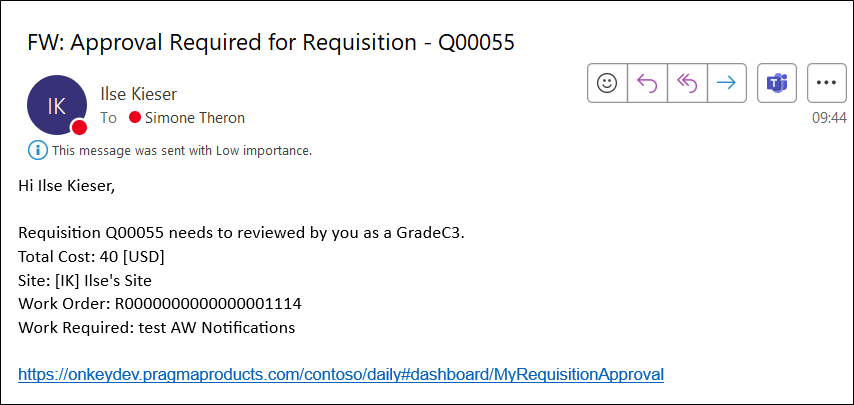
A notification email is sent to the relevant approval role(s) when a new requisition approval is created that is ready to review.
7.1 Change data trigger
Create a new change data trigger record and capture the following values on each of the tabs of the change data trigger edit screen.
| Overview | |
|---|---|
| Entity Type | Approval
|
| Trigger Once | True |
7.2 Change data trigger criteria
From the Criteria tab on the change data trigger edit screen, create a new change data trigger criteria record and capture the following values on each of the tabs of the change data trigger criteria edit screen.
For all approval workflows to have the same notification:
| Overview | |
|---|---|
| Change Type | Created
|
| Details | |
| Filter Expression | Approval->EntityType = 'Requisition' and Approval->Status = 'AwaitingApproval' and Approval->IsLocked = false
|
Or for a change data trigger on a specific approval workflow, add the Approval Expression ID to the Filter Expression.
| Overview | |
|---|---|
| Change Type | Created
|
| Details | |
| Filter Expression | Approval->EntityType = 'Requisition' and Approval->Status = 'AwaitingApproval' and Approval->IsLocked = false and Approval->Expression_Id = 38994894L
|
7.3 Notification template
Create a new notification template record and capture the following values on each of the tabs of the notification template edit screen.
| Overview | |
|---|---|
| Entity Type | Approval
|
| Output Type | Email
|
| Queries | |
| Use Audience Query | True |
| Audience Query | Approval->Role_*Id.UserSiteApprovalRole.ApprovalRole_User_PrimaryEmail
|
| Audience Query Filter | (Approval->Role_*Id.UserSiteApprovalRole.ApprovalRole_AllSites or
Approval->*EntityId.Requisition.Id_WorkOrder_Site_Id IN Approval->Role_*Id.UserSiteApprovalRole.ApprovalRole_SiteIds) and Approval->Role_*Id.UserSiteApprovalRole.ApprovalRole_IsActive = true
|
| Use Body Query | True |
| Body Query | Approval->Role_*Id.UserSiteApprovalRole.ApprovalRole_User_FullName,
|
| Output Language | System Option
|
| Templates | |
| Subject | Approval Required for {#EntityType#} - {#EntityIdRequisitionIdCode#}
|
| Body | Good day {#RoleIdUserSiteApprovalRoleApprovalRoleUserFullName#}
|
7.4 Change data trigger event
From the Notification Events tab on the change data trigger record, create a change data trigger notification event record to link the change data trigger and notification template records created above.
Example 8: Requisition approval unlocked to be reviewed email
A notification email is sent to the relevant approval role(s) when a requisition approval becomes unlocked and is ready to review.
8.1 Change data trigger
Create a new change data trigger record and capture the following values on each of the tabs of the change data trigger edit screen.
| Overview | |
|---|---|
| Entity Type | Approval
|
| Trigger Once | True |
8.2 Change data trigger criteria
From the Criteria tab on the change data trigger edit screen, create a new change data trigger criteria record and capture the following values on each of the tabs of the change data trigger criteria edit screen.
For all approval workflows to have the same notification:
| Overview | ||
|---|---|---|
| Change Type | Updated
|
|
| Details | ||
| Filter Expression | Approval->EntityType = 'Requisition' and Approval->Status = 'AwaitingApproval'
|
|
| Old Value Expression | Approval->IsLocked = true
|
|
| New Value Expression | Approval->IsLocked = false
|
|
| Trigger Properties | ||
| Path | Approval->IsLocked
|
|
Or for a change data trigger on a specific approval workflow, add the Approval Expression ID to the Filter Expression.
| Overview | ||
|---|---|---|
| Change Type | Updated
|
|
| Details | ||
| Filter Expression | Approval->EntityType = 'Requisition' and Approval->Status = 'AwaitingApproval' and Approval->Expression_Id = 38994894L
|
|
| Old Value Expression | Approval->IsLocked = true
|
|
| New Value Expression | Approval->IsLocked = false
|
|
| Trigger Properties | ||
| Path | Approval->IsLocked
|
|
8.3 Notification template
Create a new notification template record and capture the following values on each of the tabs of the notification template edit screen.
| Overview | |
|---|---|
| Entity Type | Approval
|
| Output Type | Email
|
| Queries | |
| Use Audience Query | True |
| Audience Query | Approval->Role_*Id.UserSiteApprovalRole.ApprovalRole_User_PrimaryEmail
|
| Audience Query Filter | (Approval->Role_*Id.UserSiteApprovalRole.ApprovalRole_AllSites or
Approval->*EntityId.Requisition.Id_WorkOrder_Site_Id IN Approval->Role_*Id.UserSiteApprovalRole.ApprovalRole_SiteIds) and Approval->Role_*Id.UserSiteApprovalRole.ApprovalRole_IsActive = true
|
| Use Body Query | True |
| Body Query | Approval->Role_*Id.UserSiteApprovalRole.ApprovalRole_User_FullName,
|
| Output Language | System Option
|
| Templates | |
| Subject | Approval Required for {#EntityType#} - {#EntityIdRequisitionIdCode#}
|
| Body | Good day {#RoleIdUserSiteApprovalRoleApprovalRoleUserFullName#}
|
8.4 Change data trigger event
From the Notification Events tab on the change data trigger record, create a change data trigger notification event record to link the change data trigger and notification template records created above.
Example 9: New requisition item approval created to be reviewed email
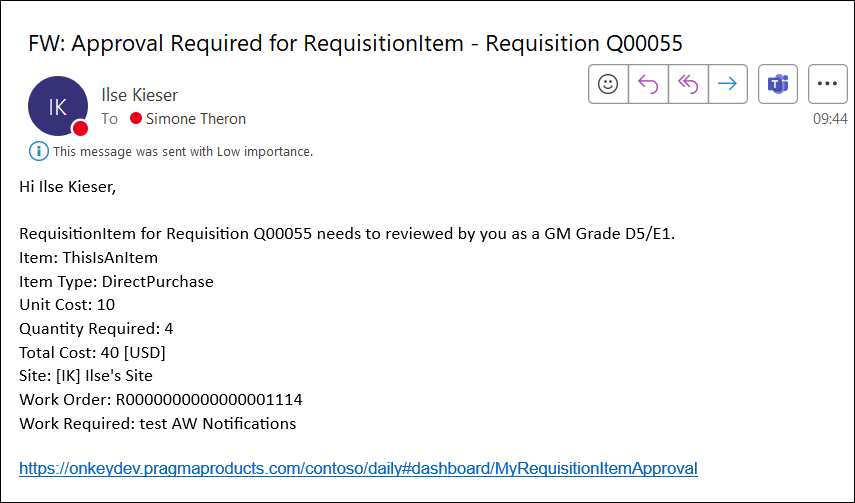
A notification email is sent to the relevant approval role(s) when a new requisition item approval is created that is ready to review.
9.1 Change data trigger
Create a new change data trigger record and capture the following values on each of the tabs of the change data trigger edit screen.
| Overview | |
|---|---|
| Entity Type | Approval
|
| Trigger Once | True |
9.2 Change data trigger criteria
From the Criteria tab on the change data trigger edit screen, create a new change data trigger criteria record and capture the following values on each of the tabs of the change data trigger criteria edit screen.
| Overview | |
|---|---|
| Change Type | Created
|
| Details | |
| Filter Expression | Approval->EntityType = 'RequisitionItem' and Approval->Status = 'AwaitingApproval' and Approval->IsLocked = false
|
9.3 Notification template
Create a new notification template record and capture the following values on each of the tabs of the notification template edit screen.
| Overview | |
|---|---|
| Entity Type | Approval
|
| Output Type | Email
|
| Queries | |
| Use Audience Query | True |
| Audience Query | Approval->Role_*Id.UserSiteApprovalRole.ApprovalRole_User_PrimaryEmail
|
| Audience Query Filter | (Approval->Role_*Id.UserSiteApprovalRole.ApprovalRole_AllSites or
Approval->*EntityId.RequisitionItem.Id_Requisition_WorkOrder_Site_Id IN Approval->Role_*Id.UserSiteApprovalRole.ApprovalRole_SiteIds) and Approval->Role_*Id.UserSiteApprovalRole.ApprovalRole_IsActive = true
|
| Use Body Query | True |
| Body Query | Approval->Role_*Id.UserSiteApprovalRole.ApprovalRole_User_FullName,
|
| Output Language | System Option
|
| Templates | |
| Subject | Approval Required for {#EntityType#} - Requisition {#EntityIdRequisitionItemIdRequisitionCode#}
|
| Body | Good day {#RoleIdUserSiteApprovalRoleApprovalRoleUserFullName#}
|
9.4 Change data trigger event
From the Notification Events tab on the change data trigger record, create a change data trigger notification event record to link the change data trigger and notification template records created above.
Example 10: Background task completed
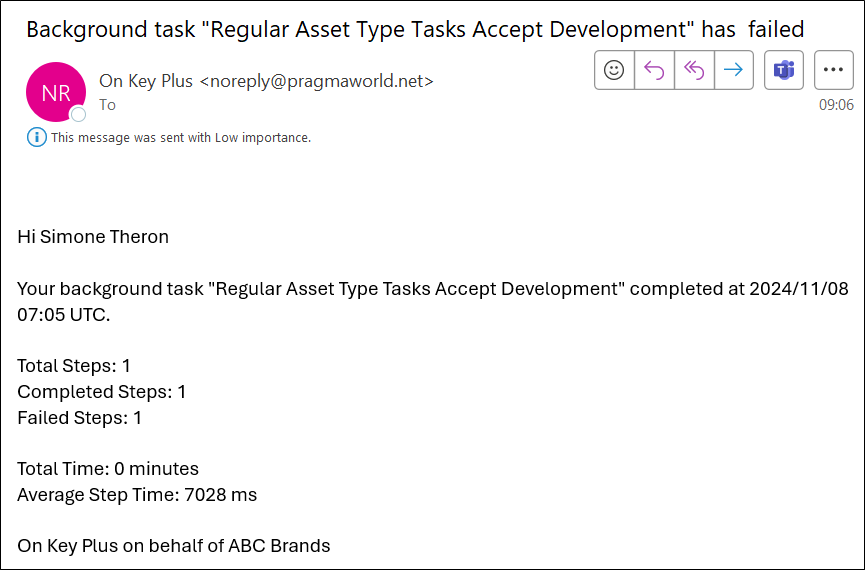
When a background task has completed or failed, a notification email is sent to the user who triggered the background task.
10.1 Change data trigger
Create a new change data trigger record and capture the following values on each of the tabs of the change data trigger edit screen.
| Overview | |
|---|---|
| Entity Type | Background Task
|
| Trigger Once | True |
10.2 Change data trigger criteria
From the Criteria tab on the change data trigger edit screen, create a new change data trigger criteria record and capture the following values on each of the tabs of the change data trigger criteria edit screen.
| Overview | |
|---|---|
| Change Type | Created
|
| Details | |
| Filter Expression | BackgroundTask->Status = 'Completed'
|
10.3 Notification template
Create a new notification template record and capture the following values on each of the tabs of the notification template edit screen.
| Overview | |
|---|---|
| Entity Type | Background Task
|
| Output Type | Email
|
| Queries | |
| Use Audience Query | True |
| Audience Query | BackgroundTask->CreatedByUser_PrimaryEmail
|
| Use Body Query | True |
| Body Query | BackgroundTask->Status,
|
| Output Language | System Option
|
| Templates | |
| Subject | Background task "{#Name#}" {#if FailedSteps = 0:completed |else: failed#}
|
| Body | {# wrap html:
|
10.4 Change data trigger event
From the Notification Events tab on the change data trigger record, create a change data trigger notification event record to link the change data trigger and notification template records created above.