Auxiliary Asset Task Screen
Data is captured on the following tab(s) of the edit screen:Overview, Planning, Spares, Resources, Sub Tasks and User Defined Fields. Below is a list of descriptions for the fields in the sections on each tab.
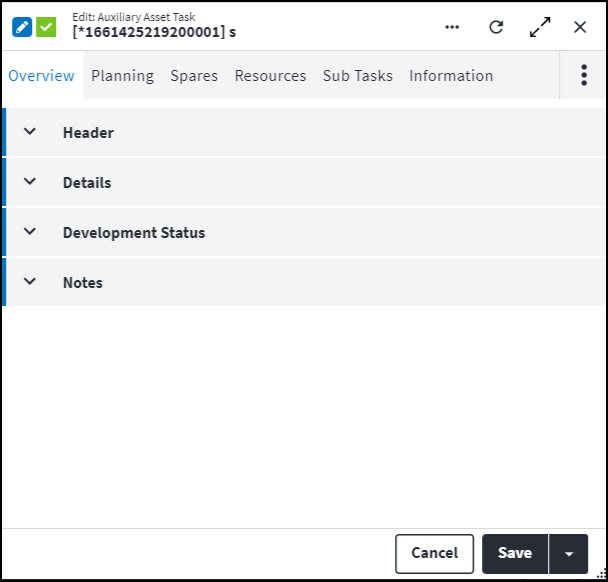
Overview
The Overview tab contains the following section(s):Header
- Code: A unique code that identifies the auxiliary task.
- Description: A short description of the auxiliary asset task.
- Alternative Description: An expanded description that can be used to add more details to the Description, especially in the case of inherited items. This description can be translated into one of the standard languages via one or more standard phrases.
- Is Active: Ticked if the record is active and available in lookup lists.
- Sequence Number: The sequence in which the records are listed. Use the sequence number to list the records in a logical order.
Details
- Auxiliary Type: Indicates whether the auxiliary task is required before (pre) or after (post) the main task. The order in which the auxiliary tasks are completed is determined by the Sequence Number.
Possible values are:Pre: The auxiliary task has to be done before the main task.Post: The auxiliary task has to be done after the main task.Pre or Post: The auxiliary task can be done either before or after the main task. This is the default value when inserting a new auxiliary task.
- Asset: The asset on which the auxiliary asset task is based.
- Component Asset: The asset component on which the auxiliary asset task is based.
Development Status
The development functionality identifies and controls the different stages of development and the entity's inheritance information. This section is autopopulated and requires no user input.Notes
Add additional details, comments or other relevant information.Planning
The Planning tab contains the following section(s):Planning
- Responsible Section: The section or company that is responsible for executing the task, for example
Mechanical SectionorContractor Section. - Responsible Trade: A trade represents a specific skillset that exists in a section, for example
Fitter and TurnerorOperator. Select the trade that is responsible for the task from the lookup list. - Responsible Resource: The staff member that is responsible for executing the task.
- First Name: The first name of the staff member responsible for executing the task. This is a read-only field that is completed by the system.
- Last Name: The last name of the staff member responsible for executing the task. This is a read-only field that is completed by the system.
Duration
- Labour Duration Calculation Type: Determines how labour records on a task will be used when calculating the total task or work order durations.
SelectParallelwhen a task's labour records are performed simultaneously with other labour records on the same task. The labour record with the longest duration will be used to calculate the labour duration.
SelectSerieswhen labour records on a task can only be performed in isolation. The sum of all the labour record times on completion will be used to calculate the labour duration. - Component Quantity: The number of component units is displayed. The Component Quantity defaults to zero if the auxiliary asset task is added to an asset.
- Auto Calculate Duration Per Unit: The duration per unit will be auto calculated when certain changes are made on the staff resource time only. The checkbox defaults to true when inserting a new record.
- Duration Per Unit: The following durations are applied if the resource durations are specified on the Resources tab and Auto Calculate Duration Per Unit is active.
If the Labour Duration Calculation Type is set toSeries, then the Duration Per Unit equals the sum of resource durations for all resources.
Alternatively, if the Labour Duration Calculation Type is set toParallel, then the Duration Per Unit equals the longest duration specified in the resources details.
This field is read-only if Auto Calculate Duration Per Unit is active. - Auto Calculate Total Duration: Total Duration will be auto calculated when certain changes are made on the staff resource time only. The checkbox defaults to true when inserting a new record.
- Total Duration: If Auto Calculate Total Duration is active, the Total Duration is calculated as Component Quantity x Duration Per Unit.
The Component Quantity value is set to1when the default value is0. Duration Per Unit is based on the asset task resource usage.
This field is read-only if Auto Calculate Total Duration is active. - Downtime Per Unit: The planned time that the component unit will not operate while work is performed. For example 00:15 standing time is allowed to prepare the component unit for maintenance. If the component unit can operate while the task is executed then downtime is 00:00.
- Auto Calculate Total Downtime: Total Downtime will be auto calculated when the Downtime Per Unit is changed or when the Component Quantity is updated.
- Total Downtime: If Auto Calculate Total Downtime is active, then the Total Downtime is calculated as Component Quantity x Downtime per Unit.
Auxiliary Asset Task Spares
A spare refers to an item that is used to replace an old or broken part. Spare parts could be a subset or complete bill of materials.
Configuring spare parts for entities on the asset type side promotes an intelligent asset type tree set-up, as assets and tasks inherit the preconfigured spare parts. This supports the planning of tactical and non tactical work and promotes efficient work management practices. Spares can also be configured on items in the asset tree.
The material master items that are required as spares are linked to the task. The following information is displayed for linked spares:
- Commodity: The commodity to which the spare is linked.
- Material Master: A unique code that identifies the material master item, for example
BELT01orBEAR01. - Quantity: The number of material master items required as spare parts for this task.
- Cost Element: The cost element to which the spare is linked. This field is mandatory and is inherited based on the following rules:
- For original tasks: The cost element value is inherited from the site Cost Element. If this is null and Replace With Stock Item for the specified stock item is not null, the Cost Element for the stock item specified in Replace With Stock Item is used. Else, the stock item Cost Element is used.
- For inherited tasks: During the synchronisation process, a check is performed to determine whether this material master item is in the asset's site's default warehouse:
- If yes: The cost element value is inherited from the site Cost Element. If this is null and Replace With Stock Item for the specified stock item is not null, the Cost Element for the stock item specified in Replace With Stock Item is used. Else, the stock item Cost Element is used.
- If no: The Stock Item Material Master is inserted, the Warehouse value is left blank and the site default Cost Element is used. If the site default Cost Element is null, a null value is inserted. This task will be uninitialised.
Auxiliary Asset Task Resources
Resources are human resources or special tools which can be applied to perform maintenance tasks on assets. Resources can be classified as staff members, special resources or contacts.
Resources are allocated trades to determine the types of jobs the resource can be used for. A resource could have multiple trades and for each trade the resource could have a different financial rate. A resource can also have multiple competencies, which are used to determine whether the resource is qualified or skilled to undertake a task.
Resources are configured and then linked to auxiliary asset tasks. The following information is displayed when resources are linked to auxiliary asset tasks:
- Section: The resource assigned to complete the task needs to work in this section.
- Trade: The trade that is required to complete the task.
- Competency: The minimum competency that the resource needs to complete the task.
- Proficiency: The level at which the resource needs to perform to complete the task.
- Duration: The time required for one resource to execute the task.
- Quantity: The number of resources with the specified trade, competency and proficiency from the specified section that are required to complete the task.
- Resource Contact Detail First Name: The first name of the resource responsible for executing the task.
- Resource Contact Detail Last Name: The last name of the resource responsible for executing the task.
- Development Status: The development functionality identifies and controls the different stages of development and the entity's inheritance information. This section is autopopulated and requires no user input.
- Is Inherited: Indicates whether this is an inherited auxiliary asset task resource.
Refer to Resources for more information.
Auxiliary Asset Task Sub Tasks
Sub tasks give structure to the task that they are added to. They specify the step-by-step procedure that is required to complete the task.
For example, the steps that must be followed for the task "Replace Bearing" are captured as sub tasks and listed in sequence in the sub tasks for the task.
During synchronisation, an asset inherits the task with its sub tasks from the asset type on which it is based.
The following information is captured when sub tasks are added to auxiliary asset tasks:
- Code: A code that identifies the sub task. The code can be edited on an original task and is not a required field.
- Description: A description of the sub task that must be completed for the task. The description must be unique and can only be edited on an original task, not on an inherited task.
- Alternative Description: An expanded description that can be used to add more details to the Description, especially in the case of inherited items. This description can be translated into one of the standard languages via one or more standard phrases. The Alternative Description can be edited on an original task, not on an inherited task.
- Development Status: The development functionality identifies and controls the different stages of development and the entity's inheritance information. This section is autopopulated and requires no user input.
- Is Inherited: Indicates whether this is an inherited sub task.
Auxiliary Asset Task User Defined Fields
User defined fields are used for capturing specific information required to support a client's custom business processes. The user defined fields on an entity are preconfigured. They pull through automatically from the user defined fields that are set up on the associated database table in the master data.
Refer to User Defined Fields for more information.
Assist custom actions
The following custom actions are available in the Assist panel in the sidebar. Keep in mind that some of these custom actions are only available from the edit screen, while others are available from both the dashboard and edit screen.- Cross References: Refer to Perform Cross Reference.
- Set Active / Set Inactive: Refer to Set Items to Active or Inactive.
- Change Permission Tree: Refer to Change Permission Tree.
- Go to Ancestor: Link to the record this selected record originated from.
- Add to Compare: Refer to Add Items for Comparison.
- Change Development Status: Refer to Development Functionality.
- View Changelog: Refer to View Changelog.