Service Level Agreement Screen
Data is captured on the following tab(s) of the edit screen: Overview, Measures and Measures Visualisation. Below is a list of descriptions for the fields in the sections on each tab.
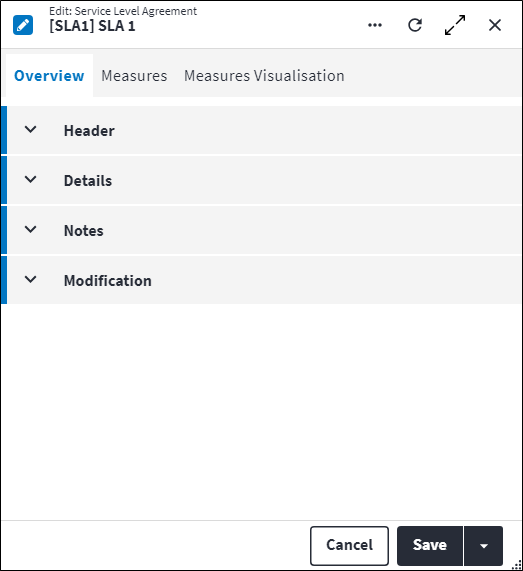
Overview
The Overview tab contains the following section(s):Header
- Code: A unique code for the SLA. Keep in mind that changes to the Code value on a template SLA are not automatically applied to non-template SLAs. A custom action can be used to align these if required. Refer to Apply Template SLA Changes to Non-Template SLAs for more information.
- Description: A short description of the SLA. Keep in mind that changes to the Description value on a template SLA are not automatically applied to non-template SLAs. A custom action can be used to align these if required. Refer to Apply Template SLA Changes to Non-Template SLAs for more information.
- Permission Tree: A field linked to a permission record in a permission tree, that determines whether a user has rights to access records and/or make changes to records. This is assigned by the system where possible. Keep in mind that changes to the Permission Tree value on a template SLA are not automatically applied to non-template SLAs. A custom action can be used to align these if required. Refer to Apply Template SLA Changes to Non-Template SLAs for more information.
- Sequence Number: The sequence in which the records are listed. Use the sequence number to list the records in a logical sequence. Keep in mind that changes to the Sequence Number value on a template SLA are not automatically applied to non-template SLAs. A custom action can be used to align these if required. Refer to Apply Template SLA Changes to Non-Template SLAs for more information.
- Is Active: Ticked if the record is active and available in lookup lists.
Details
- SLA Classification: The preconfigured classification applicable to this service level agreement. Once the record is saved, the SLA Classification value cannot be changed.
- Is Template: When a new SLA or SLA measure is created, Is Template is always true. Once an SLA with its linked SLA measure(s) appear on a work order, a snapshot of that SLA with its linked SLA measure(s) is linked to the work order for historical purposes. The snapshot SLA and its linked SLA measure(s) have Is Template set to false.
If updates are made to the SLA or its linked SLA measure(s), the updated SLA and SLA measure(s) have Is Template set to true, while the original SLA and its linked SLA measure(s) Is Template value is updated to false.
Is Template is system assigned and cannot be edited by the user. The non-template SLA is a snapshot at a point in time. It is not kept in alignment with the template SLA from which it originated, but certain fields can be aligned if required. Refer to Apply Template SLA Changes to Non-Template SLAs for more information. - Template SLA: If Is Template is set to false, the template SLA for this SLA is referenced here. If Is Template is set to true, Template SLA is null. Template SLA is system assigned and cannot be edited by the user.
- Match Criteria: The expression that contains the criteria that needs to be met on a work order for this SLA to be assigned to the work order. For example work orders with
BreakdownType of Work andMediumWork Order Importance should have this SLA assigned.
If match criteria is not specified, the SLA will match with all work orders. - Work Order Start Status: Indicates the earliest work order Work Order Start Status that is specified on all linked SLA measures.
- Work Order End Status: Indicates the latest work order Work Order End Status that is specified on all linked SLA measures.
- Is Initialised: Indicates whether the SLA is ready to be used. Only when Is Initialised is true, can this SLA be assigned to work orders. The SLA can only be initialised if:
- Enable Service Level Agreements is set to true in system options - refer to Work Order Defaults Screen for more information;
- it has at least one SLA measure linked to it;
- it has one SLA measure linked to it with Is Main Measure set to true when the Match Type of the linked classification is set to
Single Assign; - it has no SLA measures linked to it with Is Main Measure set to true when the Match Type of the linked classification is set to
Multiple Assign; - it has no SLA measure linked to it with Is Main Measure set to false and Target Field to assign set to Required By date when the Match Type of the linked classification is set to
Single Assign. Only the main measure can set the Required By date.
If an SLA measure that is linked to this SLA is edited or additional SLA measures are linked to this SLA, the initialisation status of this SLA is re-evaluated. If the SLA no longer conforms to the rules specified above, the SLA has to be uninitialised (using the Set Uninitialised custom action in the Assist panel in the sidebar) before editing the SLA measure(s). After editing the SLA measure(s), the SLA can be reinitialised. - Measure from Assigned Date: If set to true, the SLA and its linked SLA measures are measured from the date of it being assigned to the work order for the first time, ie as soon as the work order satisfies the Match Criteria. This also applies to any work order SLA measures linked to this SLA. The time between the work order going into the Work Order Start Status until the Match Criteria being satisfied is not taken into account.
Measure from Assigned Date takes preference over Reset Measurement on Reassign Date. If Measure from Assignment Date is set to true, the setting of Reset Measurement on Reassign Date is irrelevant.
In practice this means that a new work order SLA and linked work order SLA measures will be created every time a work order meets the Match Criteria. For every subsequent match after the first match, the Measure from Assignment Date field will be set to true on the work order SLA. - Reset Measurement on Reassign Date: Reset Measurement on Reassign Date is only applicable when Measure from Assignment Date is set to false. If Measure from Assignment Date is set to true, the setting of Reset Measurement on Reassign Date is irrelevant.
When an SLA gets assigned to a work order more than once (ie the work order is in status range again due to Match Criteria being met or work order updates) and Reset Measurement on Reassign Date is set to true, the work order SLA measure Assignment Date is updated to the date of reassignment. Is Historic on the SLA is not set to true in this case, but the original linked SLA measures are set to historic and new SLA measures are added to the work order.
If set to false, the original work order SLA measure Assignment Date is kept as is when the SLA is reassigned to the work order once again. Is Historic on the linked SLA measures is also not set to true, they continue counting from the previous time the SLA was applied to the work order.
Reset Measurement On Reassign Date on the SLA is not related to Resettable Measure on the SLA measure. With Reset Measurement On Reassign Date, the SLA is reassigned to the work order once again due to Match Criteria being met or work order updates. With Resettable Measure, the same SLA still applies to the work order, but due to status updates on the work order, it applies for a second or more time.
Refer to Service Level Agreement Classifications, Service Level Agreement Measure Screen and Work Order Service Level Agreement Screen for more information.
Notes
Add additional details, comments or other relevant information.Modification
Displays details of when the record was created and last updated. This section is autopopulated and requires no user input.Service Level Agreement Measures
An SLA measure is the duration measurement between the work order status that signifies the start of the SLA and the work order status that signifies the end of the SLA.
SLA measures are linked to SLAs. Click  in the toolbar to link an SLA measure. Once linked, the SLA measure and its associated details is listed in the grid on the Measures tab. The following information is displayed:
- Code and Description: The linked SLA measure.
- Is Main Measure: Indicates whether this SLA measure is a main measure. The main SLA measure of an SLA sets the Required By date of the work order.
If Match Type is set toSingle Assign, the SLA has to have one linked SLA measure with Is Main Measure set to true. An SLA cannot have more than one linked SLA measure with Is Main Measure set to true.
If Match Type is set toMultiple Assign, the SLA cannot have any linked SLA measures with Is Main Measure set to true as there can be no main measures on multiple assign SLAs. - Work Order Start Status: The work order Status value that signifies the start of the SLA measurement, for example
Quote Requested.
Work order Base Status values are ordered by the system as follows:Awaiting Approval, thenApproved, thenCompleted, thenClosedand thenCancelled. The Work Order Start Status cannot have an higher ordered Base Status value than the Work Order End Status. If the Work Order Start Status and Work Order End Status have the same Base Status value, the Work Order Start Status has to have a lower Sequence Number value than the Work Order End Status. - Work Order End Status: The work order Status value that signifies the end of the SLA measurement, for example
Quote Received.
Work order Base Status values are ordered by the system as follows:Awaiting Approval, thenApproved, thenCompleted, thenClosedand thenCancelled. The Work Order End Status cannot have a lower ordered Base Status value than the Work Order Start Status. The Work Order End Status can be the same as the Work Order Start Status to measure how long the work order spent in this specific status. - Calendar Type: The type of calendar that is applicable to this SLA measure. Possible values are:
None: This SLA measure does not refer to any specific calendar, so SLAs will be measured continuously (24 hours per day, 7 days per week).Custom: A custom calendar needs to be specified in Calendar. SLAs will only apply during the specified working hours.Work Order Asset: The same calendar is used that is applicable to the work order asset.
- Resettable: If Resettable Measure is set to true, the SLA measure is reset when the work order Status is set to the specified Work Order Start Status for a second or more time, ie the work order went out of status range and back into status range via the specified Work Order Start Stage. A new work order SLA measure is created with Is Historical set to false and the original work order SLA measure Is Historical is set to true. The SLA is measured from scratch once again.
If Resettable Measure is set to false, the original work order SLA measure continues to be used even if the work order Status is set to the specified Work Order Start Status for a second or more time.
Resettable Measure on the SLA measure is not related to Reset Measurement On Reassign Date on the SLA. With Resettable Measure, the same SLA still applies to the work order, but due to status updates on the work order, it applies for a second or more time. With Reset Measurement On Reassign Date, the SLA is reassigned to the work order once again due to Match Criteria being met or work order updates.
Refer to Service Level Agreement Measures for a practical example.
Refer to Service Level Agreement Measures for more information.
Service Level Agreement Measures Visualisation
The Measures Visualisation tab contains a graphical representation of the SLA measures that are linked to this SLA. From here, linked SLA measures can be viewed, new SLA measures can be created (); and existing SLA measures can be updated ( ) and deleted (
 ).
).
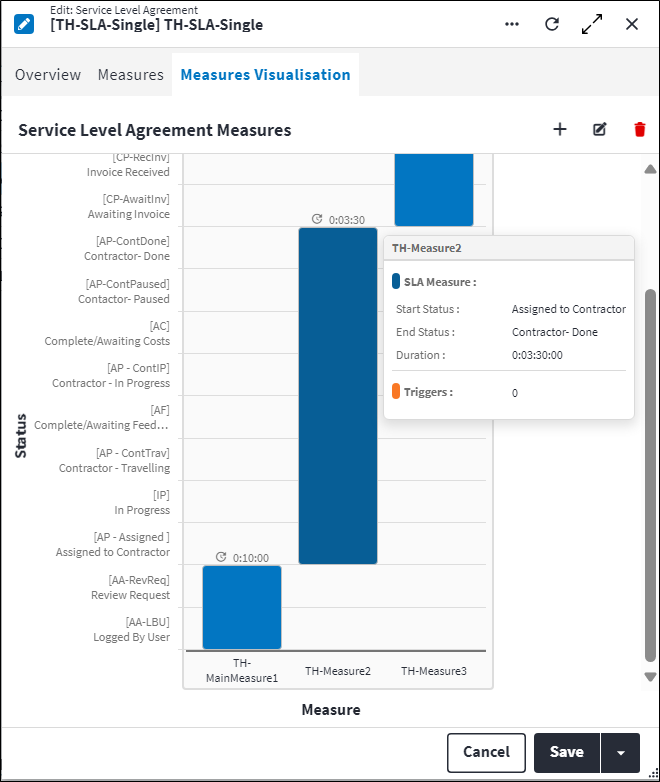
Each SLA measure is displayed as a bar with the SLA measure description on the x-axis and work order status description on the y-axis . Work order statuses are ordered by Base Status in the following order from bottom to top: Awaiting Approval, Approved, Completed, Closed, Cancelled. If more than one work order status has the same base status, work order statuses are ordered by Sequence Number. If the sequence number values are null, zero or equal, work order statuses are ordered by ID.
If multiple SLA measures apply, the SLA measures are ordered by Sequence Number. If the sequence number values are null, zero or equal, the sort order cannot be guaranteed.
The following information is displayed for each measure:
- Description is displayed on the x-axis, for example
Accept Work. - Duration is displayed above each bar, for example
04:00. - Work Order Start Status is the point on the y-axis the bar starts, for example
To Be Accepted - Quote Required. - Work Order End Status is the point on the y-axis this bar ends, for example
Accepted - Quote Required. - If triggers have been configured for the measure, each trigger is indicated with an orange dashed line on the SLA measure.
The following information is displayed upon hovering over the SLA measure:
- Description, for example
Accept Work. - Duration, for example
04:00. - Work Order Start Status, for example
To Be Accepted - Quote Required. - Work Order End Status, for example
Accepted - Quote Required. - Number of Triggers, for example
1. - SLA Trigger Description is displayed if Number of Triggers is greater than
1, for exampleWarning. - SLA Trigger Percentage is displayed if Number of Triggers is greater than
1, for example80%.
Assist custom actions
The following custom actions are available in the Assist panel in the sidebar. Keep in mind that some of these custom actions are only available from the edit screen, while others are available from both the dashboard and edit screen.
- Cross References: Refer to Perform Cross References.
- Set Active / Set Inactive: Refer to Set Items to Active or Inactive.
- Set Initialised / Set Uninitialised: Refer to Is Initialised.
- Add to Compare: Refer to Add Items for Comparison.
- Change Permission Tree: Refer to Change Item's Permission Tree.
- View Changelog: Refer to View Changelog.
- Apply Updates to Non-Template SLAs: Refer to Apply Template SLA Changes to Non-Template SLAs.